Managing Family Changes in DAISEY for Kansas UHV
Child Moving to New Family, with New Primary Caregiver
There may be times when a child moves from one family/primary caregiver to another, and you want to reflect that change in DAISEY. For example, a child may transition from living with her foster parent to living with her biological parent. The guidance below is how the Children’s Cabinet would like grantees to manage that child’s family records in the DAISEY system*.
Managing DAISEY Family Changes
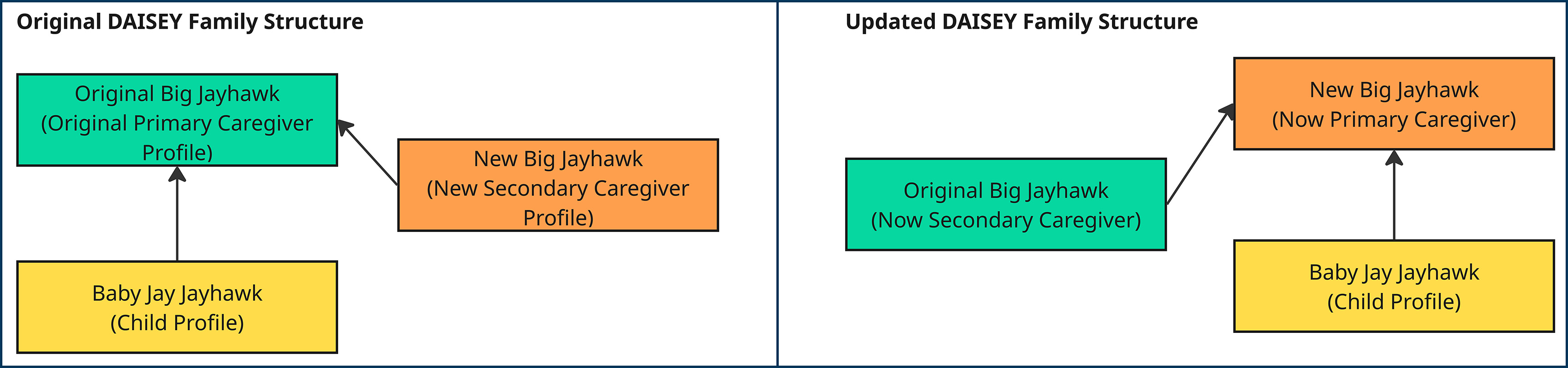
Once associated to a Primary Caregiver, a Child profile cannot be unassociated or reassigned to a new family in DAISEY. In many cases, it is most appropriate to build out and revise the existing family in DAISEY.
- Open the original parent/Primary Caregiver profile, scroll to the bottom of the page and click “Add Secondary Caregiver”. Fill in the blank profile form with the new caregiver’s demographics. Click Save.
- The “Successfully saved caregiver” alert will pop up and ask where you’d like to go to next. Navigate to “Family Activities”.
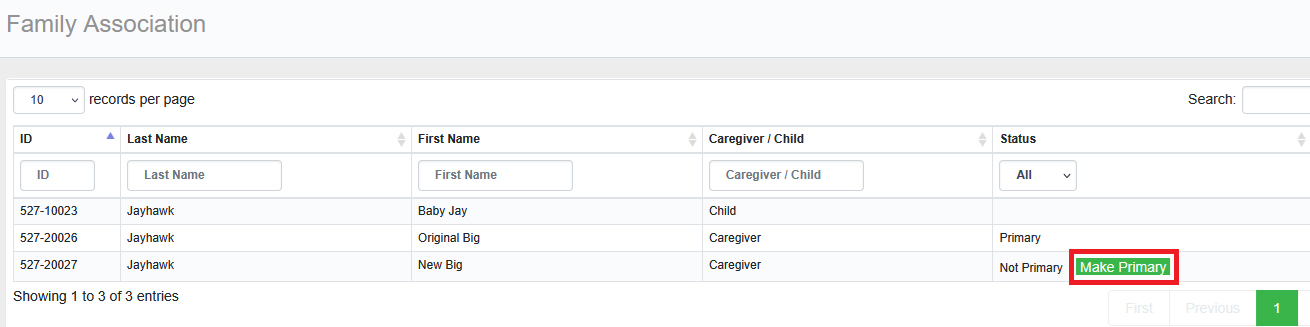
- On the Family Association page, you will see the original primary caregiver listed as well as the newly created caregiver. Click the “Make Primary” button next to the new caregiver profile, making that person the new Primary Caregiver (see image below).
- Once the new Primary Caregiver is assigned to the family, the original caregiver will be assigned as a secondary caregiver.
- Revise each caregiver profile to ensure accurate information is saved in their respective profiles. Important questions to review/update:
- On original primary caregiver, now assigned as secondary caregiver
- “Caregiver’s Relation to Primary Caregiver”
- Add discharge date, if appropriate
- On new primary caregiver
- Add Household Information and Income Sources to the profile
- On original primary caregiver, now assigned as secondary caregiver
- Revise the child profile to have updated demographics/responses. This may include an updated “Child Relationship to Primary Caregiver” response and address.
By building out the existing family in DAISEY, historical data linked to that child and other caregivers will be retained. No duplicate child profiles will need to be created, with activity forms being split between two families in the DAISEY system.
Reminder: If the new Primary Caregiver profile was created by clicking on the “Add Caregiver” button on the Search Caregiver grid, the new profile will not be able to be merged to the child’s existing family in DAISEY.
Back to Kansas UHV Find Answers.